


轴套定义6个自由度状态连接(包括X、Y、Z 3个方向的平移与旋转)。轴套通过属性文件定义其3个方向的线性刚度和3个方向旋转的扭转刚度,刚度可以是线性数据,也可以是非线性数据。需要强调的是,轴套属性文件中数据曲线参考的是局部坐标系,而非全局坐标系。
单击Build > Attachments > Bushing > New命令,弹出创建衬套对话框,如图1-13所示。
1.齿条箱与齿条箱安装件之间轴套
(1)在下列对话框中输入相应的数据:
· Bushing Name(约束副名称):rack_housing_bushing;
· I Part:._my_steering.ges_rack_housing;
· J Part:._my_steering.sws_rack_house_mount;
· Inactive(抑制):kinematic mode(运动学模式);
· Geometry Length(几何长度):20;
· Geometry Radius(几何半径):40;
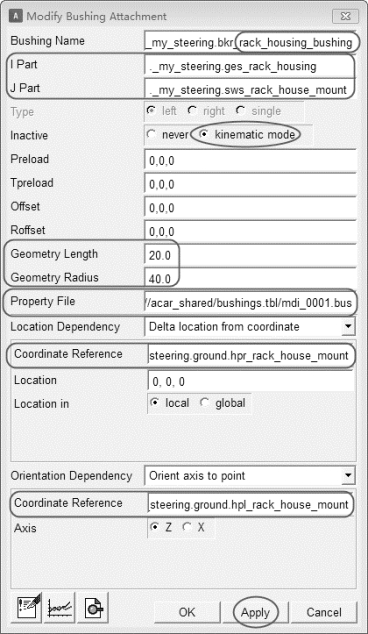
图1-13 轴套创建对话框
· Property File:mdids://acar_shared/bushings.tbl/mdi_0001.bus;
· Location Dependency:Delta location from coordinate;
· Coordinate Reference(参考坐标):._my_steering.ground.hpl_rack_house_mount;
· Location:0,0,0;
· Location in:local;
· Orientation Dependency:Orient axis to point;(https://www.xing528.com)
· Coordinate Reference(参考坐标):._my_steering.ground.hpr_rack_house_mount。
(2)单击Apply按钮,完成rack_housing_bushing轴套的创建。
2.转向轴与小齿轮之间轴套
(1)在下列对话框中输入相应的数据:
· Bushing Name(约束副名称):torsion_bar;
· I Part:._my_steering.ges_steering_shaft;
· J Part:._my_steering.ges_pinion;
· Inactive(抑制):never;
· Geometry Length(几何长度):20;
· Geometry Radius(几何半径):30;
· Property File:mdids://acar_shared/bushings.tbl/mdi_0001.bus;
· Location Dependency:Delta location from coor arb_middledinate;
· Coordinate Reference(参考坐标):._my_steering.ground.hps_pinion_pivot;
· Location:0,0,0;
· Location in:local;
· Orientation Dependency:Orient axis to point;
· Coordinate Reference(参考坐标):._my_steering.ground.hps_intermediate_shaft_forward。
(2)单击OK按钮,完成torsion_bar轴套的创建。
免责声明:以上内容源自网络,版权归原作者所有,如有侵犯您的原创版权请告知,我们将尽快删除相关内容。
